هذا المحتوى متاح بالإنجليزية حاليًا.
Arabic is not a mirror: RTL lessons from our Flutter apps
Flipping the whole screen gets you 80% of an Arabic app. The last 20% is where users notice. Eight rules we now follow in every Flutter app we ship.
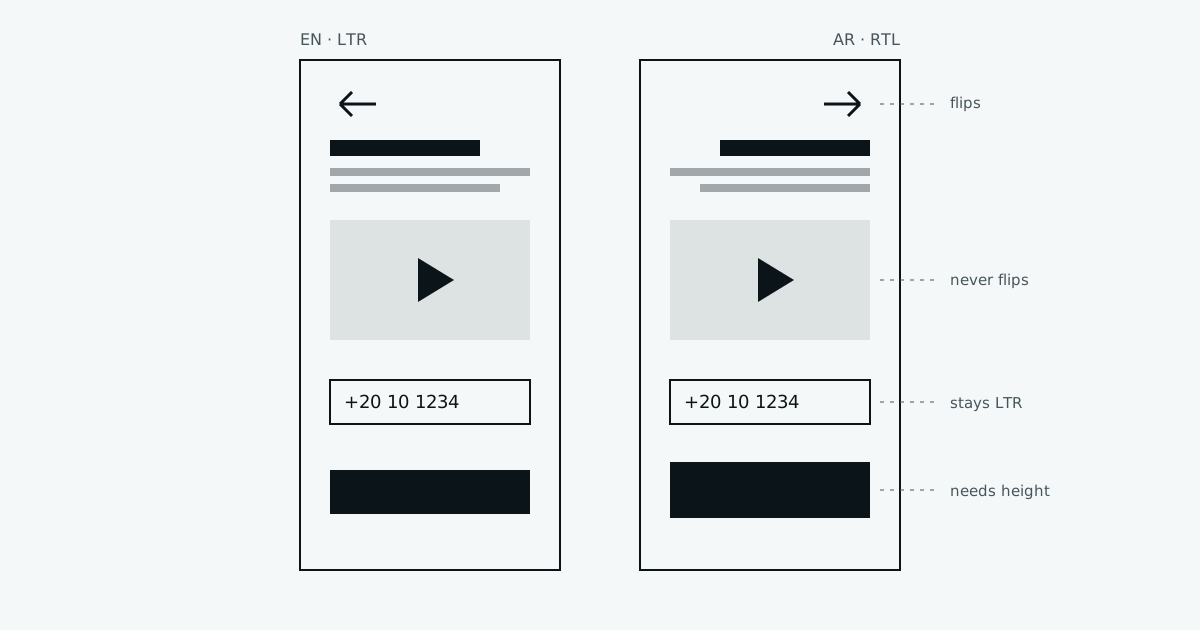
The first time we switched one of our apps to Arabic, it looked done in about ten seconds. Flutter flipped the whole screen. Text moved to the right. Back arrows pointed the other way.
Then we gave it to a real user. In two minutes she found five things that were wrong. The phone number field was backwards. The play button pointed at her. A price read "EGP 250" in a strange order. A button cut off the bottom of the letters.
Flipping the screen is the easy 80%. This post is about the other 20%, the part users actually notice. These are the rules we now follow in every app.
1. Think "start" and "end", not "left" and "right"
This is the rule that fixes most problems on its own. In English, "start" is left. In Arabic, "start" is right. If your code says left, it is wrong in one of the two languages.
Flutter has a "directional" version of almost everything:
// Wrong in one of the two languages
padding: EdgeInsets.only(left: 16),
alignment: Alignment.centerLeft,

// Right in both
padding: EdgeInsetsDirectional.only(start: 16),
alignment: AlignmentDirectional.centerStart,
The same goes for PositionedDirectional, BorderRadiusDirectional, and TextAlign.start. We added a lint check that warns on EdgeInsets.only(left: and Alignment.centerLeft. It caught 40 places on the first run.
2. Some icons flip. Some must never flip.
Icons that show direction in the flow of reading should flip: back, forward, "next" chevrons, a reply arrow.
Icons that show something from the real world should stay as they are:
flowchart TD
    Q{Does the icon point<br/>along the reading direction?}
    Q -->|Yes: back, next, reply| F[Flip it in RTL]
    Q -->|No| R{Is it a real-world thing?}
    R -->|Play, clock, checkmark| K[Never flip]
    R -->|Logo, brand mark| K
    R -->|Not sure| T[Ask a native reader]
A play button always points right, because that is how a tape moves, in every language. A clock always turns the same way. A checkmark is not a direction.
In Flutter, built-in icons like Icons.arrow_back already flip by themselves. They use matchTextDirection. Your own custom icons do not, so set it yourself when they should flip:
const IconData nextIcon = IconData(0xe800,
    fontFamily: 'AppIcons', matchTextDirection: true);
3. Phone numbers and codes stay left-to-right
A phone number is not a sentence. It is read the same way in Cairo and in London. So are one-time codes, card numbers and times.
In an RTL screen, Flutter will right-align these fields and the cursor starts on the wrong side. Users type a code and watch the digits appear in an order that feels backwards. We wrap these fields:
Directionality(
  textDirection: TextDirection.ltr,
  child: TextField(
    keyboardType: TextInputType.phone,
    textAlign: TextAlign.start,
  ),
)
The label above the field stays in Arabic. Only the field itself is left-to-right.
4. Pick one kind of digits, and stick to it
Arabic has its own digits: ٠١٢٣٤٥٦٧٨٩. Many apps in Egypt use the Western ones: 0123456789. Both are fine. Mixing them is not.
Our rule: inputs accept both, and save Western digits. A user can type ٠١٠ on an Arabic keyboard, and we turn it into 010 before we check or send it. Display follows what the client chose for the brand. We decide it once, write it down, and use one helper function everywhere.
5. Mixed text needs a little help
The hardest bugs come from one line that mixes Arabic and English, like a court name, a price, or a username.
The phone uses the Unicode bidi algorithm to decide the order of mixed text. It works most of the time. When it fails, it fails in a way that looks like a typo: "EGP" lands on the wrong side of the number, or a full stop jumps to the start of the line.
The fix is to wrap the "foreign" part so it is treated as one block:
// U+2068 starts an isolated block, U+2069 ends it
String isolate(String s) => '$s';
Text('الملعب ${isolate(courtName)} محجوز');We only do this for text that comes from users or from data. Our own translated strings are written correctly by the translator.
6. Arabic needs more height
Arabic letters go higher and lower than Latin ones. A button that fits "Book now" perfectly will cut the dots under "احجز الآن".
flowchart LR
    A[Fixed height: 40] --> B[English fits]
    A --> C[Arabic dots cut off]
    D[Padding + min height] --> E[Both fit]
Two habits fixed this for us:
- No fixed heights on anything with text. Use padding and a minimum height instead.
- More line height for Arabic body text. About 1.7 to 1.9, compared to around 1.5 for English.
7. Never add letter spacing to Arabic
Arabic letters join to each other. Letter spacing pulls them apart and breaks the joins, so words become hard to read. A design may ask for wide spacing on a label in English. In Arabic, that value must be zero. We set it in the theme, per language, so nobody has to remember.
8. Test in both directions, every time
We had a rule that "someone checks Arabic before release". It did not work. Now the computer checks:
for (final dir in TextDirection.values) {
  testWidgets('booking card, $dir', (tester) async {
    await tester.pumpWidget(
      Directionality(textDirection: dir, child: const BookingCard()),
    );
    await expectLater(
      find.byType(BookingCard),
      matchesGoldenFile('booking_card_${dir.name}.png'),
    );
  });
}
Every widget test runs twice, once in each direction, with a saved picture to compare against. If someone uses left by mistake, the RTL picture changes and the test fails.
The short version
| Rule | Why |
|---|---|
| Start/end, not left/right | Works in both languages with no extra code |
| Flip direction icons only | A play button is not a direction |
| Numbers and codes stay LTR | They are read the same everywhere |
| One kind of digits | Mixing looks broken |
| Isolate mixed text | Stops "typo-looking" order bugs |
| No fixed heights, more line height | Arabic needs room |
| No letter spacing in Arabic | It breaks the letters apart |
| Test both directions | People forget. Tests do not. |
An Arabic user can tell in a few seconds whether an app was built for them or translated for them at the end. Most of the difference is in these small things.
Read more
- Flutter: Internationalizing Flutter apps: the official guide to locales, translations and text direction.
- Flutter API: EdgeInsetsDirectional: start/end padding, and the other "directional" classes listed beside it.
- Flutter API: IconData.matchTextDirection: how icons decide whether to flip.
- Material Design: Bidirectionality: a clear guide to what should and should not mirror, with pictures.
- W3C: Inline markup and bidirectional text: why mixed text goes wrong, explained simply (written for the web, but the ideas are the same).
- Unicode: The Bidirectional Algorithm (UAX #9): the full rules, if you want to know exactly how the phone decides the order.