RBAC end to end: how we handle permissions in web apps
Our admin screen hid the button, but the API still said yes. Here is how we now decide who can do what: three questions for every request, deny by default, and one test that makes forgetting impossible.
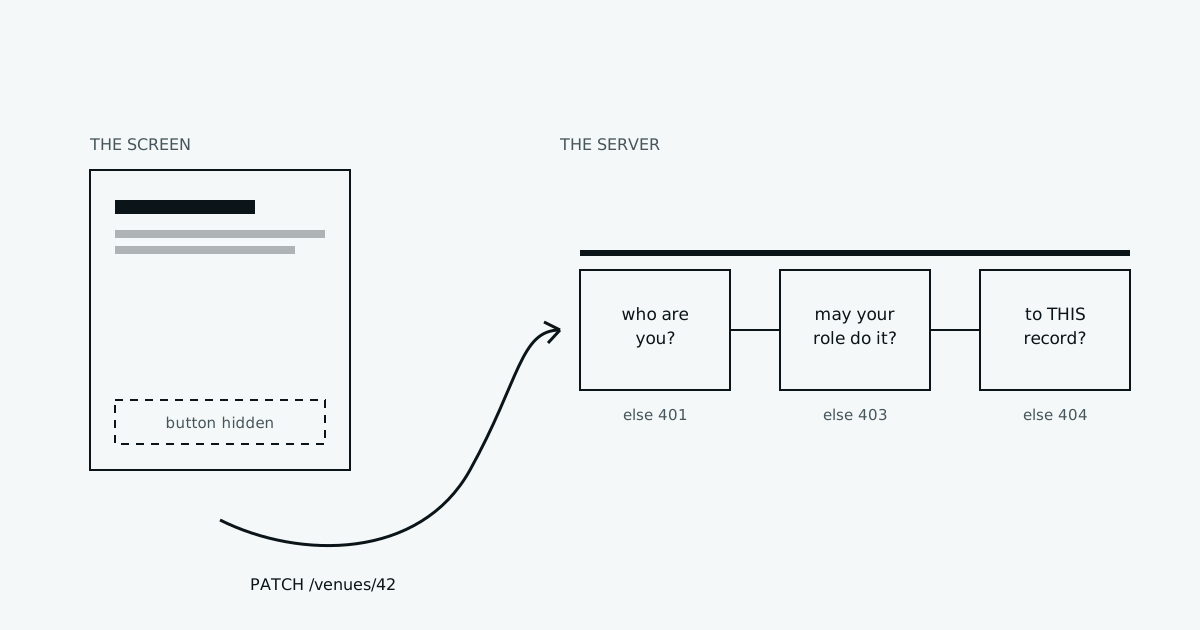
A few weeks before a release, we were testing the booking API by hand on staging. Not through the app, just raw requests. One of them should have failed. It did not.
The endpoint for holding a court had no permission check at all. In the app, only signed-in players ever saw the "Book" button, so nobody noticed. But the API does not know about buttons. Anyone who could send a request could call it.
Nothing bad happened. We found it first. But it changed how we build every web app since. This post is the system we use now. It is not tied to one framework. The examples are in NestJS and React because that is what we use, but the ideas work anywhere.
Two different questions
People often mix up two words:
- Authentication asks: who are you? This is login, passwords, one-time codes, tokens.
- Authorization asks: are you allowed to do this? This is permissions.
Most frameworks give you good authentication out of the box. Authorization is almost always left to you. That is where the bugs are.
flowchart LR
    R[Request] --> A{Who are you?}
    A -->|unknown| E401[401 Unauthorized]
    A -->|known user| B{May your role<br/>do this action?}
    B -->|no| E403[403 Forbidden]
    B -->|yes| C{May you do it<br/>to THIS record?}
    C -->|no| E404[404 Not found]
    C -->|yes| OK[Do the work]
Every request that changes or reads private data has to pass all three gates. Most bugs we have seen, in our code and in code we have reviewed, come from skipping the third one.
Rule 1: the server decides, every time
The browser is not yours. Anyone can open the developer tools, copy a request, change it, and send it again. Hiding a button, disabling a field, or removing a page from the menu is good for user experience. It is not security.
So the rule is simple: every check that matters happens on the server. The frontend may also check, to show the right buttons. But if the frontend check and the server check ever disagree, the server wins.
Rule 2: check permissions, not role names
The first version of most apps looks like this:
if (user.role === 'admin' || user.role === 'owner') {
  // allow
}
It works until the business adds a role. Then someone has to find every if in the codebase and decide whether the new role belongs in it. They will miss one.
Instead, code only ever asks about permissions, small named actions like booking.create or venue.update. Which roles have which permissions is data, kept in one place. This is what RBAC (role-based access control) means: users get roles, roles get permissions, and the code only checks permissions.
| Permission | Player | Owner | Staff | Admin |
|---|---|---|---|---|
booking.create | ✓ | ✓ | ✓ | ✓ |
booking.cancel.any | ✓ | ✓ | ✓ | |
venue.update | ✓ | ✓ | ||
venue.approve | ✓ | |||
report.view | ✓ | ✓ |
Now adding a role is a change to the table, not a search through the code. And the table is easy to read in a review. A product person can check it without reading any code.
Rule 3: deny by default
The bug we found was not a wrong check. It was a missing check. Somebody wrote a new endpoint and forgot the line. That will always happen, so the system must make forgetting safe.
In NestJS we use one global guard. Every route must say, out loud, either which permission it needs or that it is public. A route that says nothing is refused:
export const Requires = (...perms: string[]) => SetMetadata('requires', perms);
export const Public = () => SetMetadata('public', true);

@Injectable()
export class PermissionGuard implements CanActivate {
  constructor(private reflector: Reflector) {}

  canActivate(ctx: ExecutionContext): boolean {
    const targets = [ctx.getHandler(), ctx.getClass()];
    if (this.reflector.getAllAndOverride('public', targets)) return true;

    const needed = this.reflector.getAllAndOverride<string[]>('requires', targets);
    if (!needed) throw new ForbiddenException('NO_PERMISSION_RULE');

    const user = ctx.switchToHttp().getRequest().user;
    return needed.every((p) => user?.permissions?.includes(p));
  }
}
It is registered once, for the whole app, so nobody has to remember to add it:
providers: [{ provide: APP_GUARD, useClass: PermissionGuard }]And a controller now reads like a short contract:
@Post(':venueId/holds')
@Requires('booking.create')
hold(@Param('venueId') venueId: string, @Body() dto: HoldDto) { ... }

@Get('venues')
@Public()
list() { ... }
Look at the difference. Before, a forgotten line meant "everyone may do this". Now a forgotten line means "nobody may do this", and the developer finds out the first time they try their own endpoint.
Rule 4: a test that makes forgetting impossible
Deny by default catches a missing rule at runtime. We also want to catch it before merge. So we have one test that walks through every route in the app and fails if any of them has no decision:
it('every route declares a permission or @Public', async () => {
  const app = await createTestApp();
  const discovery = app.get(DiscoveryService);
  const scanner = app.get(MetadataScanner);
  const reflector = app.get(Reflector);
  const missing: string[] = [];

  for (const ctrl of discovery.getControllers()) {
    const proto = Object.getPrototypeOf(ctrl.instance);
    for (const name of scanner.getAllMethodNames(proto)) {
      const handler = proto[name];
      if (!Reflect.getMetadata(PATH_METADATA, handler)) continue; // not a route
      const targets = [handler, ctrl.metatype];
      const decided =
        reflector.getAllAndOverride('requires', targets) ||
        reflector.getAllAndOverride('public', targets);
      if (!decided) missing.push(`${ctrl.name}.${name}`);
    }
  }

  expect(missing).toEqual([]);
});
When this test fails, its message is a list of the exact routes that need a decision. It takes ten minutes to write and it has caught a missing rule more than once since.
Rule 5: "may I?" is also about this record
Gate three is where most real attacks happen. A venue owner has the permission venue.update. Good. But which venue?
PATCH /venues/42If the server only checks the permission, any owner can edit venue 42, even if it belongs to someone else. They just change the number in the URL. This bug is so common it has a name: Broken Object Level Authorization. It is number one on the OWASP list of API security risks.
The safest fix is to put the ownership check inside the database query, so it cannot be skipped:
const result = await db.venue.updateMany({
  where: { id: venueId, ownerId: user.id },
  data: dto,
});
if (result.count === 0) throw new NotFoundException();
Two details matter here:
- The
wherehas both the id and the owner. If either is wrong, nothing is updated. There is no separate "check first, then update" step to forget. - We answer 404, not 403. A 403 tells the caller "this venue exists, you just can't touch it". A 404 tells them nothing. Do not help people map your data.
Lists need the same care. "Show my bookings" must be filtered by the user in the query, never fetched in full and filtered in code afterwards. We keep small helpers like scopeToOwner(user) that return the right where for each role, so every list is scoped the same way.
Rule 6: what you may see is a permission too
Permissions are not only about actions. A venue owner should see the names of players who booked their courts. Should they see their phone numbers? Maybe. Their email? Probably not. An admin may see everything.
The bug here is returning the database row straight to the client:
return db.booking.findMany({ where, include: { user: true } }); // sends everythingThat sends every column, including the ones you add next year. Instead, each response has its own shape, built on purpose:
return bookings.map((b) => ({
  id: b.id,
  court: b.courtName,
  time: b.during,
  player: { name: b.user.name, phone: canSeePhones ? b.user.phone : undefined },
}));
It is a little more code. It is also the only way to be sure that a new database column does not leak the day it is added.
The frontend: one source of truth
The frontend still needs to know what to show. We do not copy the rules there. After login, the API returns the user's permissions, and the app asks one small helper:
const { permissions } = useMe();
const can = (p: string) => permissions.includes(p);

return (
  <>
    {can('booking.cancel.any') && <CancelButton />}
    {can('report.view') && <ReportsLink />}
  </>
);
The list comes from the same table the server uses. When the business changes a role, both sides change together. And if the frontend is ever wrong, the server still says no.
A bug we did not expect: users with no role
Here is one that surprised us. On staging, every demo player suddenly got 403 on "my bookings". The code was right. The guard was right. The players simply had no role at all.
The demo data was being created before the roles existed. So each player was saved, then the roles were created, and nobody was ever given one. Deny by default did its job and refused them, which is how we found it fast.
Two rules came out of it:
- A user is created and given their base role in the same transaction. There is no moment where a user exists without a role.
- On startup, the app checks for any user with no role and gives them the base one, with a log line saying how many it fixed. It should almost always say zero.
Tokens can go out of date
Many apps put the user's role inside their login token. It is fast, because the server does not have to look anything up. But think about what happens when an admin removes someone's owner role. Their token still says "owner" until it expires, which might be days.
We keep tokens short-lived and load permissions on each request from a fast cache. When a role changes, we clear that user's cache entry. The change works within seconds, not days.
401, 403 or 404?
Small thing, but it confuses people, so we wrote it down once:
| Situation | Answer | Why |
|---|---|---|
| Not logged in, or token expired | 401 Unauthorized | "Tell me who you are." The app can refresh the token or show login. |
| Logged in, but the role cannot do this action | 403 Forbidden | "I know you, and the answer is no." |
| Logged in, but this record is not theirs | 404 Not Found | Do not confirm the record exists. |
| Route has no permission rule | 403 NO_PERMISSION_RULE | A developer forgot. The test should have caught it. |
Write it down when it matters
For actions that matter (changing prices, approving a venue, cancelling someone else's booking) we also keep an audit log: who did it, to what, when, and the value before and after. You rarely read it. When you need it, nothing else can replace it.
The checklist
- The server checks every action. The frontend only hides things for comfort.
- Code checks permissions, never role names. Roles map to permissions in one table.
- Deny by default: a route with no rule is refused.
- One test lists every route and fails if any has no decision.
- Ownership is checked inside the query, and the answer is 404.
- Every response has its own shape. Never return a raw database row.
- Users get their base role at creation, in the same transaction.
- Permission changes take effect in seconds, not when a token expires.
- Important actions go to an audit log.
None of this is clever. That is the point. Permissions should be boring, written in one place, and impossible to forget.
Read more
- OWASP API Security Top 10 (2023): the list where Broken Object Level Authorization is number one. Short and very practical.
- OWASP Authorization Cheat Sheet: deny by default, least privilege, and checking on every request, explained simply.
- NestJS: Guards: how guards work, including global guards with
APP_GUARD. - NestJS: Authorization: role and permission patterns in Nest, with examples.
- MDN: 403 Forbidden: what the status codes mean, with the related 401 and 404 pages linked.
- PostgreSQL: Row security policies: the next step, where the database itself refuses rows that do not belong to the user.
- Zanzibar: Google's consistent, global authorization system: how permissions work at a very large scale. Not something you need on day one, but it changes how you think about "who can do what to which thing".